One interface for AI in the dashboard
How AI features in Knecht work through one shared tool registry and one shared loop, and why the same tools should later be reachable through MCP too.
Until now, AI in Knecht only ran in the sandbox of a run, through OpenCode. Now it also comes to the dashboard. The first feature explains why a run failed. More features will follow. Later, external AI tools like Claude Code should also reach Knecht through MCP. All of them need access to runs, logs and workflows. We did not want each of them to build this access and the permission checks on its own. So they all go through one shared interface. This post shows how it works.
The failure diagnosis
Let's start with the first feature that uses AI in the dashboard. It diagnoses why a run failed. For this, it reads the run log, the logs of the actions and the workflow itself.
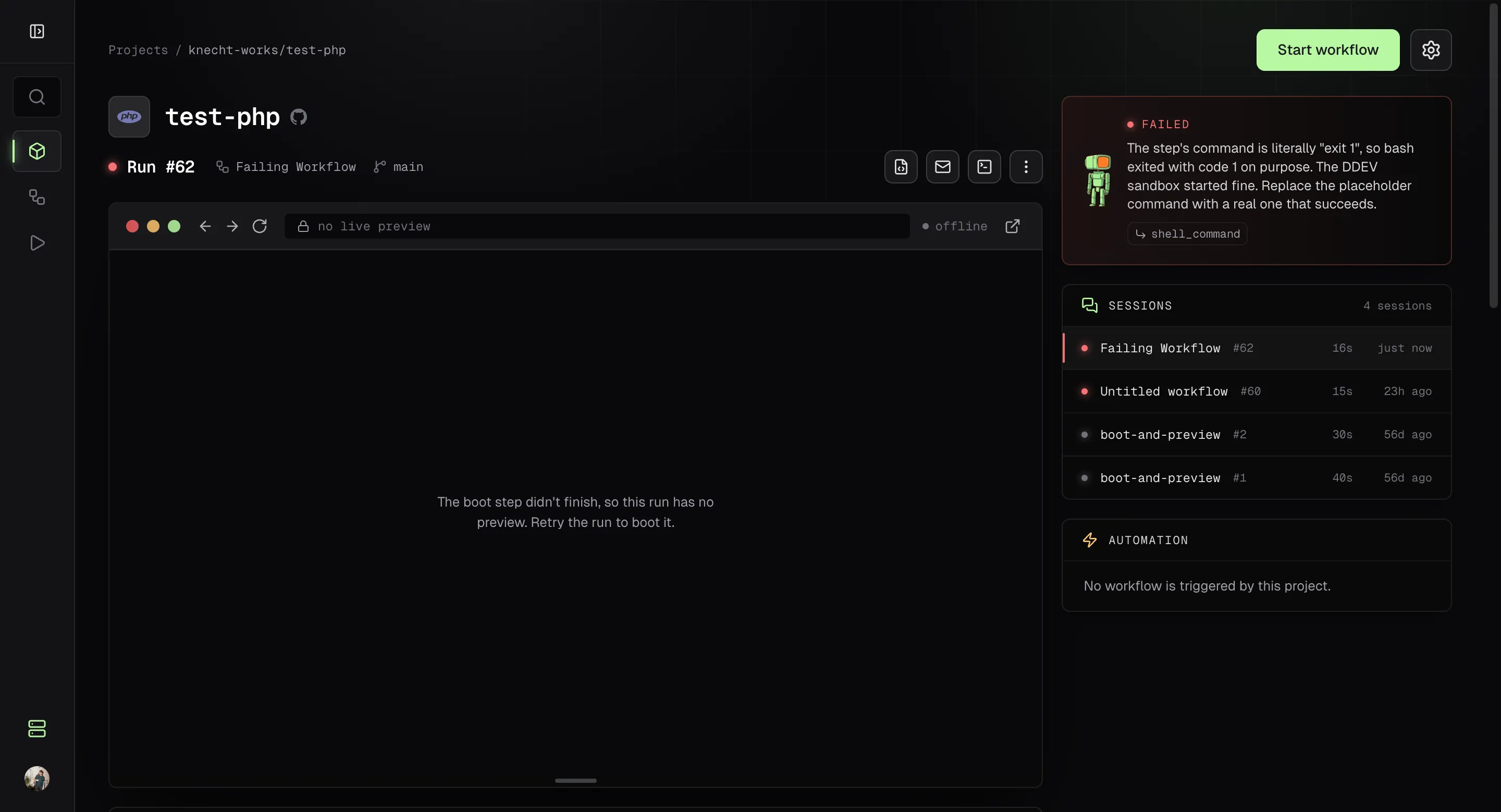
When a run fails, the status card on the project page first shows "Knecht is looking into why the last run failed." Shortly after, it shows the cause and the most likely fix in one or two sentences. Below that, Knecht shows a button for each action whose log shows the cause. A click takes you straight to that action in the workflow editor, opens it and scrolls to it, so you can fix it right away.
Architecture
More features are already planned, for example one that explains why a workflow is slow or one that suggests improvements to a workflow. Two terms matter for all of them. A tool is one single operation that an AI may perform. A feature defines which tools an AI gets for one specific task.
Tools
A tool has a name, a description for the model, an input schema and a scope. The schema is written with Zod. The model gets a JSON Schema from it, and Knecht uses it to check every input. Here is a very simplified version of the tool that reads the log of an action:
export const getActionLogTool = defineTool({
  name: 'get_action_log',
  description: 'Returns the log of one action of a run.',
  scope: 'runs:read',
  input: z.object({ runId: z.number(), actionId: z.number() }),
  run: ({ runId, actionId }) => readActionLog(runId, actionId),
})
All tools live in one registry in the server. So far there are only tools that read, for runs, logs, projects and workflows. This tool list will grow with every feature.
Every call of a tool goes through callTool. It checks the input against the schema, and permissions. The scope of a tool is the permission it needs. For example, runs:read allows reading runs and their logs. The actor of the request must have that permission, otherwise callTool throws an error.
Features
A feature describes a task in the dashboard. It sets the model, the instructions, the allowed tools, the format of the answer and the maximum number of steps. This is the failure diagnosis feature:
const diagnosis = defineAiFeature({
  id: 'failure-diagnosis',
  model: 'fast',
  instructions: 'You explain why a run of Knecht failed. ...',
  tools: [getRunTool, getActionLogTool, getRunLogTool, getWorkflowTool],
  output: z.object({ summary: z.string(), actionIds: z.array(z.number()) }),
  maxSteps: 4,
})
So the diagnosis may read a run, the logs of its actions, the log of the whole run and the workflow itself. Nothing more. Another feature gets another list. The list is fixed in the code, and an AI cannot look for more tools. model: 'fast' names a model role, not a concrete model. The section on the model call below explains what that means.
Agentic loop
Every feature runs through the same function:
const result = await runAiFeature(diagnosis, prompt)
runAiFeature gives the model the prompt and the tools of the feature. The model decides which tool it calls. For example, the log of the failed action may not show a cause, so the model wants to read the log of an earlier action. Knecht runs the call and returns the result. This repeats until the model answers or the step limit is reached. This process is called an agentic loop.
In the last allowed step, the model may not call any tools. Otherwise a model that still wants to search could end without an answer. The answer always comes in the format the feature sets. For the diagnosis, that is a summary plus the ids of the affected actions.
The agentic loop also comes from the AI SDK, a TypeScript library that puts the APIs of many model vendors behind one interface.
The model call
For the sandbox agent, Knecht uses OpenCode. It talks to the model itself, and Knecht only hands it the key and the config. By contrast, a dashboard feature runs in the Knecht server without an OpenCode process. There, the server calls the model directly through the AI SDK.
The loop asks for the model by its role:
const model = await languageModel('fast')
languageModel reads the provider, the API key and the model from the settings. The role default stands for the "Default model". The role fast stands for the "Subtask model", or for the default model if no subtask model is set. Therefore you can change the model in the settings without changing the code.
The AI SDK has one package per vendor, and each provider maps to one of them. Shortened, it looks like this:
switch (provider) {
  case 'anthropic': return createAnthropic({ apiKey })(model)
  case 'openai': return createOpenAI({ apiKey })(model)
  case 'google': return createGoogleGenerativeAI({ apiKey })(model)
  case 'langdock': return isClaude(model)
    ? createAnthropic({ apiKey, baseURL: langdockAnthropicUrl })(model)
    : createOpenAI({ apiKey, baseURL: langdockOpenAiUrl })(model)
}
Langdock speaks the Anthropic API for Claude models and the OpenAI API for all other models. OpenCode Zen and Go serve each model through the API of its vendor. Knecht looks up which API that is in models.dev.
So the dashboard features use the same provider, key and region as OpenCode.
MCP coming soon
This architecture is not only meant for the dashboard. With the Model Context Protocol (MCP), AI tools such as Claude Code or Cursor can use tools from outside. When Knecht gets an MCP server, it will use the same tools.
Dashboard feature ──> runAiFeature ──> callTool ──> Tool
MCP client ──> MCP server ────────────> callTool ──> Tool
The dashboard feature picks its tools in code. For an MCP client, the scopes of its token decide which tools it sees. Both paths end at callTool. So the same checks apply, whether a feature in the dashboard asks or an external AI tool.
What comes next
Our vision for Knecht is that AI should be as native as possible. The AI features should not feel like a handicapped add-on, but like a natural part of the dashboard. The shared registry and loop are a first step.
More useful features will follow soon and the architecture is ready for them now.
We are excited about the possibilities. We hope you are too. If you have ideas for features, please let us know!